





What Is Immutable Backup and Why Does It Matter for Ransomware Recovery?
By Ryan Tucker, Solutions Architect
Learn how immutable backups protect data from deletion, encryption, and ransomware attacks so organizations can recover clean copies.
Table of Contents
In summary
An immutable backup is a backup copy that cannot be changed or deleted. This makes it highly effective against ransomware, because attackers cannot modify or destroy the protected backup data even if production systems are compromised. Writing data to immutable storage is an effective way to create an immutable backup.
Ransomware attacks are a major threat to modern organizations. Cybercriminals encrypt an organization’s data and demand payments to restore access to it. Modern ransomware also attempts to destroy existing backup files to prevent recovery. Therefore, you must protect backup targets with strong data isolation controls.
An immutable backup is one which can’t be modified or deleted, preventing the backup from being compromised by an attacker. This article explains how object storage features can be used to create an immutable backup.
Megaport Storage acts as an object storage backup target, with versioning and object lock available to protect data. Object lock provides the Write Once, Read Many (WORM) control that makes a backup immutable.
What is immutable backup?
An immutable backup is a backup copy that cannot be altered. This is achieved by keeping the data on immutable or offline storage. Once data is written to immutable storage it can’t be changed or removed. No user can edit, overwrite, or delete the file during its retention period.
How do immutable backups work?
Immutable backups use immutable or offline storage to create backups that cannot be changed. Traditional storage relies on file permissions and retention policies that attackers may be able to change using compromised credentials or exploits. Immutable backups, on the other hand, lock the data at the storage layer. Even if an attacker gains administrative or root credentials, they are unable to modify or delete the backup.
Why are immutable backups important for ransomware protection?
Immutable backups are an important defense against ransomware. In addition to encrypting the victim’s production data, modern ransomware also seeks to destroy backups to prevent data recovery. Immutable backups cannot be destroyed by an attacker, allowing data to be restored.
Can ransomware delete or encrypt immutable backups?
As an immutable backup can’t be modified by anyone, it can’t be deleted or encrypted by ransomware. Traditional storage relies on file permissions and retention policies to protect data. An attacker may be able to circumvent these controls and compromise backups. An immutable backup solves this problem by using storage controls which prevent any changes to the data.
What is the difference between immutable backup and traditional backup?
Modern systems typically store backups on disks, storage arrays, hosted services, or other online locations. Unlike older offline storage systems like tapes, online storage allows the data to be accessed at any time. This introduces a risk that the backups are altered or destroyed. An immutable backup is one which is kept on immutable storage to ensure the backup cannot be modified or deleted.
What is immutable storage?
Immutable storage is storage that prevents the data on it from being modified or removed. Historically this was often implemented using physical controls. Modern storage systems use technical controls which allow the immutability to be configured, for example for a specific period of time.
What features should immutable backup storage include?
For a storage system to facilitate immutable backups, it needs to provide features that allow data to be written once, then prevent it from being modified or deleted. This can be physical controls like mechanical switches or offline/air gapped storage — but modern systems typically implement storage-level settings. The most common examples are versioning and object lock.
- When versioning is enabled, the system will create a new version of an object each time it is modified rather than overwriting the existing copy.
- Object lock provides further protection by preventing removal of object versions within a configured retention period.
How Megaport Storage supports ransomware-resilient backup
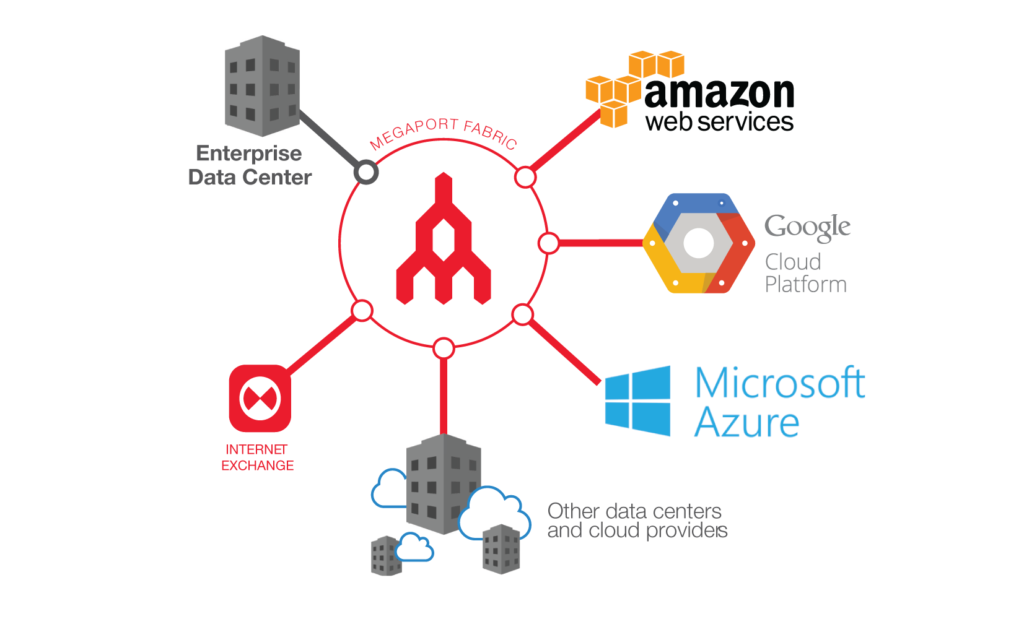
Built as a globally distributed storage platform integrated directly into the Megaport backbone and co-located with Latitude.sh compute infrastructure, Megaport Storage simplifies how organizations store, move, and access data across distributed environments.
Customers can provision storage on demand, connect it privately through the Megaport fabric, and avoid much of the operational and commercial friction commonly associated with moving large volumes of data between environments.
Megaport Object Storage is optimized for backup, recovery, and data-intensive workloads.
How to enable versioning and object lock
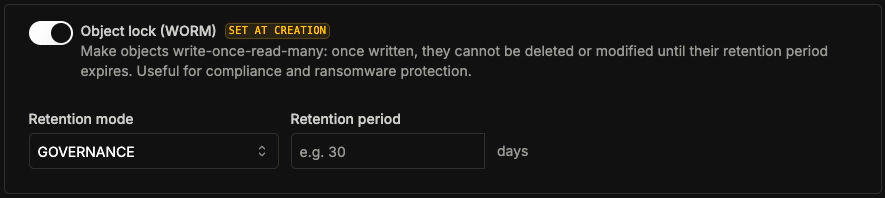
Megaport Storage uses two key features for data protection: versioning and object lock. When you enable versioning, the storage system keeps every version of a file (an object). If an application modifies or deletes an object, Megaport Storage creates a new copy (version ID) and the original object version remains intact inside the storage bucket.

Object lock extends versioning by applying WORM retention rules to object versions, preventing them from being deleted or modified. The retention period defines the duration for which the versions cannot be changed. For example, you can set a retention period of 30 days.
Compliance mode and Governance mode
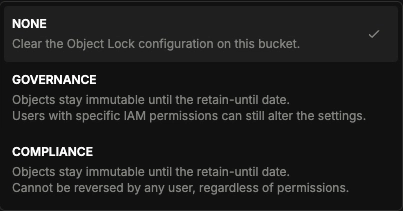
Object lock has two retention modes: Compliance mode and Governance mode. Both modes protect object versions during the retention period. However, the two modes enforce administrative access rules in different ways.
In Governance mode, authorized users with the specific BypassGovernanceRetention permission can alter files during the retention period. This is separate from standard write permissions and is typically not assigned to any accounts or used in normal operations. Governance mode is useful when an organization needs an approved exception process.
Compliance mode provides the highest level of data protection. In Compliance mode, no user can delete or overwrite a locked object version. Even the root account holder and storage administrators cannot alter or shorten the retention period. Compliance mode satisfies strict regulatory requirements for data immutability and compliance.
Conclusion
Ransomware attacks continue to increase in frequency and sophistication. Protecting your backups with immutable copies is essential for cyber resilience and is often required for regulatory compliance. Megaport Storage provides S3-compatible object storage with versioning and object lock to support immutable storage. By using Compliance mode with a defined retention period, you guarantee that ransomware cannot alter or destroy your backups.
Explore Megaport Storage