





What is Backup and Disaster Recovery? A Complete Guide
By Serena Toh, Solutions Architect
Learn what backup and disaster recovery means, how BDR works, and why it matters for reducing downtime and data loss.
In summary
Backup and disaster recovery, often called BDR, is the combination of copying business data and restoring systems after an outage, cyberattack, human error, or infrastructure failure. Backup protects data by creating recoverable copies, while disaster recovery focuses on restoring applications, systems, and operations. Together, they help organizations reduce downtime, data loss, and business disruption.
Backup and disaster recovery (BDR) is what keeps data loss from becoming a business-wide catastrophe.
And to protect their business, IT teams need to ask if they can recover the right data, in the right order, fast enough for the business to keep operating. A backup can preserve a copy of a file, database, or workload, but disaster recovery is what brings the wider service back online.
This guide explains how BDR works, what belongs in a BDR strategy, how to evaluate BDR services, and where storage and connectivity decisions affect recovery outcomes.
Table of Contents
What is backup and disaster recovery?
Backup and disaster recovery is the combined practice of protecting data with recoverable copies and restoring systems after a disruption.
Backup is about the data. It creates copies of files, databases, objects, images, application data, configurations, or other business records so they can be restored if something goes wrong.
Disaster recovery is about the operating environment. It covers the systems, infrastructure, applications, network paths, access controls, dependencies, and procedures needed to restore a service after an incident.
For example, say a company’s production server is hit by ransomware. The company may have clean backups of its files and databases, but simply having those backups isn’t enough to get the business back up and running. It also needs a disaster recovery plan that outlines which backup to use, how to restore the affected systems, reconnect essential applications and services, and get everything back online.
A useful disaster recovery plan defines how an organization will protect its data and recover its systems when something goes wrong. It typically covers:
- what data and systems need protection
- how often backups should run
- how long backups should be retained
- where recovery copies should live
- how quickly systems need to come back
- who owns each recovery step
- how recovery will be tested.
In simple terms, backup gives an organization something to recover from, while disaster recovery provides the process for getting systems and services back online. Together, they help organizations recover from data loss, system failures, cyberattacks, and other disruptions while minimizing downtime and operational impact.
RTO vs RPO
Two important recovery objectives help shape a BDR strategy: Recovery Point Objective (RPO) and Recovery Time Objective (RTO).
RPO (Recovery Point Objective) defines how much data a business can afford to lose if something goes wrong, while RTO (Recovery Time Objective) defines how quickly a system or service needs to be restored.
Simply put, RPO is about data loss, while RTO is about downtime.
RTO and RPO are important to a BDR strategy because they set clear recovery targets for business systems and data. They help businesses determine how often data should be backed up or replicated and how quickly systems need to be recovered.
For example, an RPO of 15 minutes means the business can tolerate up to 15 minutes of data loss. An RTO of one hour means the affected service should be restored within one hour.
Together, RPO and RTO help ensure that a BDR strategy provides the appropriate level of data protection and recovery for the business.
What is the difference between backup and disaster recovery?
Backup protects the data; disaster recovery restores the service.
Area | Backup | Disaster recovery |
Primary job | Create recoverable data copies | Restore systems and operations |
Main question | Can we get the data back? | Can we bring the service back? |
Scope | Files, databases, snapshots, objects, repositories | Applications, infrastructure, networks, dependencies, failover, runbooks |
Key metrics | Retention, backup success, restore success | Failover success, service availability, recovery sequence |
Example failure | Accidental deletion or corrupted database | Site outage, infrastructure failure, ransomware event, cloud-region issue |
A backup on its own doesn’t guarantee recovery. A team may have a clean backup but still miss its recovery target if the restore path is too slow, the recovery environment isn’t ready, network throughput is constrained, or application dependencies aren’t documented.
Why does backup and disaster recovery matter?
BDR matters because downtime and data loss can affect revenue, customer access, security response, compliance obligations, and internal operations.
Common causes include ransomware, human error, failed migrations, storage failure, software defects, network outages, power issues, cloud service disruption, and physical site events. BDR gives teams a defined way to recover when any one of these events interrupts normal operations.
Ransomware has made backup design even more important because attackers may try to delete, encrypt, or disable backup systems before recovery begins. CISA recommends maintaining offline, encrypted backups of critical data and regularly testing the availability and integrity of backups in a disaster recovery scenario.
The business impact also depends on the type of workload affected.
If a customer-facing application goes down, customers may not be able to access services, make transactions, or complete purchases. This can lead to lost revenue, frustrated customers, and reputational damage.
For transactional and financial systems, particularly in banking, downtime or data loss can disrupt payments, fund transfers, card transactions, ATM services, and online banking, while also creating reconciliation, regulatory, and compliance challenges. Strong BDR capabilities are therefore essential to protect data integrity, support fast recovery, and ensure business continuity while maintaining customer trust.
For internal file shares and collaboration systems, the impact may be less visible but can still make it difficult for employees to access important information and continue their daily work.
This is why not every workload needs the same level of protection or recovery. Organizations should prioritize systems based on how critical they are to the business and how much downtime or data loss the business can tolerate.
The level of protection a workload needs depends on two key questions: How much data can the business afford to lose, and how quickly does the system need to be restored? These requirements are defined by RPO and RTO.
What are BDR services?
BDR services are managed or platform-based services that help organizations back up data, replicate systems, monitor backup health, orchestrate recovery, and restore operations after disruption.
They may include:
- scheduled backups
- snapshot management
- replication
- off-site or cloud backup repositories
- immutable or isolated backup storage
- recovery orchestration
- restore testing
- monitoring and alerting
- reporting
- managed recovery runbooks
- disaster recovery as a service.
A BDR service can simplify operations, but it doesn’t remove the need for planning. Teams still need to define critical workloads, recovery targets, security controls, ownership, dependencies, and test schedules.
What causes data loss and downtime?
Data loss and downtime usually come from a combination of technical failures, operational errors, security incidents, and dependency failures.
Cause | What can happen | BDR response |
Ransomware or destructive malware | Data is encrypted, deleted, or made unavailable | Keep isolated or immutable backup copies and test recovery |
Human error | Files, databases, or configurations are deleted or overwritten | Use versioning, retention policies, and tested restores |
Hardware or storage failure | Production systems lose access to data | Replicate or back up to independent storage |
Software failure | Updates, bugs, or corruption affect applications or data | Preserve recovery points and document rollback paths |
Network outage | Teams can’t access backup targets or recovery environments | Design recovery connectivity and bandwidth in advance |
Cloud or service disruption | A region, API, SaaS app, or provider dependency becomes unavailable | Plan workload-specific recovery paths and dependencies |
Physical event | A site becomes unavailable | Keep off-site copies and recovery environments |
What should a backup and disaster recovery strategy include?
ISO 22301 and NIST SP 800-34 both emphasize that a BDR strategy should reflect the organization’s business continuity and recovery requirements. RTO and RPO help define those requirements and consequently influence the backup, recovery, and disaster-recovery strategies and technologies needed to meet them.
According to the AWS Well-Architected Framework, organizations should first define their recovery objectives, including RTO and RPO, and then select a recovery strategy that can meet those objectives. Generally, achieving shorter RTOs and RPOs requires recovery approaches with greater infrastructure, operational complexity, and cost.
Next, identify what needs protection, how recovery will happen, and how the business will know the plan works. Core components include:
- Business impact analysis: Identify critical systems, data, dependencies, users, and business processes. NIST includes business impact analysis as part of contingency planning.
- RPO and RTO: Define how much data loss and downtime the business can tolerate for each workload.
- Backup scope: Include production data, application configuration, identity dependencies, infrastructure definitions, logs, and operational documentation.
- Retention policy: Define how long data should be kept based on recovery, business, and compliance needs.
- Storage architecture: Decide where backups live, how they’re protected, and how quickly they can be restored.
- Security controls: Use encryption, access controls, MFA, separation of duties, and backup account isolation.
- Recovery runbooks: Document the recovery order, owners, access requirements, dependencies, and validation steps.
- Testing schedule: Test restores and failover regularly, then update the plan when systems change.
A strong BDR strategy should also include regular testing and validation. According to CISA’s ransomware guidance reinforces the need to test backup availability and integrity, not just create backups. ISO 22301 also provides a business continuity framework for preparing for, responding to, and recovering from disruptive incidents.
How do you choose the right data backup and recovery approach?
The right data backup recovery approach depends on the workload, recovery target, data volume, security requirements, and restore path.
Here’s a general decision guide:
Approach | Good fit | Watchouts |
Local backup | Fast restores for nearby systems | Doesn’t protect against full-site failure |
Off-site backup | Site-level resilience | Restore time depends on network and data volume |
Cloud or object storage backup | Scalable backup repositories and long-term retention | Review restore speed, connectivity, access, and cost model |
Replication | Lower RPO for critical workloads | Can replicate corruption if not paired with versioning or isolation |
Immutable or offline backup | Ransomware resilience | Needs operational discipline and restore testing |
Managed BDR or DRaaS | Smaller teams or complex recovery operations | Confirm scope, ownership, testing, and recovery guarantees |
Questions to answer before choosing:
- Which workloads need the fastest recovery?
- How much data changes between backup points?
- How large would a full restore be?
- Where would recovery happen?
- What bandwidth is available for backup and restore traffic?
- What data needs encryption, residency controls, or access segmentation?
- Who owns recovery during an incident?
- How often will recovery be tested?
- What is our RPO and RTO?
- Where do we want to store backup copies, and what options are available for location and data residency?
What are backup and disaster recovery best practices?
BDR best practices should reduce the chance of data loss and make recovery repeatable.
- Set workload-specific RPO and RTO. Don’t apply the same recovery target to every system.
- Keep multiple backup copies. CISA references the 3-2-1 strategy: three copies of data, on two different media, with one copy kept off-site for disaster recovery.
- Keep at least one backup isolated. Offline, immutable, or logically separated backups help protect recovery copies from ransomware and misconfiguration.
- Encrypt backup data. Protect data at rest and in transit.
- Limit backup access. Use least privilege, MFA, role-based access, and separate backup administration from standard production access.
- Test restores. A backup that hasn’t been restored is an assumption.
- Document dependencies. Include identity, DNS, certificates, secrets, network paths, databases, and application tiers.
- Monitor backup health. Failed jobs, aging snapshots, and capacity warnings should trigger action.
- Update plans after change. BDR plans need review after migrations, architecture changes, new compliance requirements, or major application updates.
How does Megaport Storage support backup and disaster recovery?
Megaport Storage supports backup and disaster recovery as part of the storage and connectivity layer for modern recovery architectures.
Megaport Storage includes object, block, and file storage options all connected via the Megaport platform — designed to support backup, archive, AI, and data-intensive workloads. With direct connectivity via the Megaport fabric, and access over a direct connection without exposure to shared infrastructure, Megaport Storage is ideal for backup and recovery.
- Object storage for backup targets: Standard Object Storage is ideal for backup and disaster recovery storage, long-term retention, and general-purpose storage where cost efficiency and scalability matter.
- S3-compatible storage: Megaport Object Storage is S3-compatible, making it easy for teams to integrate with backup platforms that already write to S3-compatible storage targets.
- Direct network path: Access and migrate storage over the Megaport network for a private alternative to the public internet.
- Enterprise backup and disaster recovery: Object Storage supports enterprise backup and disaster recovery using existing tools, helping teams add scalable storage targets without rebuilding their backup workflows.
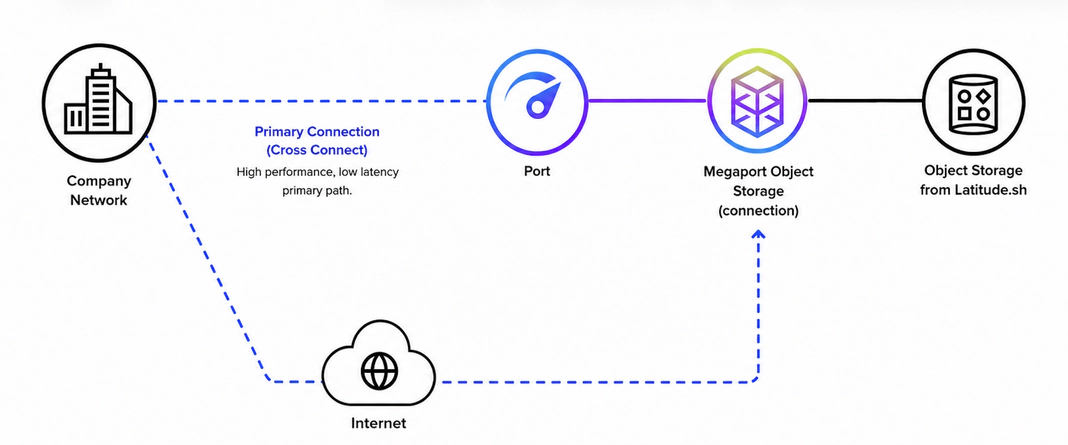
A primary storage connection uses your existing network path, while an internet-based connection provides a secondary path for access to storage during a primary-path disruption.
Block and File Storage for recovery workloads
Megaport’s other storage types can play a different role in a BDR architecture.
- High-Performance Block Storage is designed for latency-sensitive workloads such as databases, virtual machines, and applications requiring predictable IOPS.
- High-Performance File Storage is designed for shared file workloads where multiple servers need access to the same data.
- High-Performance Object Storage is designed for active data workloads such as data lakes, analytics pipelines, and content repositories.
This means an organization can use Object Storage for its backup repository, while Block or File Storage supports applications and workloads within a secondary or disaster-recovery environment.
Conclusion
Backup and disaster recovery are connected, but they aren’t the same thing. Backup protects recoverable copies of data. Disaster recovery restores the systems, applications, and operations that depend on that data.
A strong BDR strategy starts with business priorities, then maps those priorities to storage architecture, security controls, recovery runbooks, and regular testing. The goal is to build the right recovery design for each workload, even if those designs are simple.
Decide where backup copies will be stored, how they will be protected, and how quickly they can be accessed or restored during recovery. A well-designed storage architecture should consider factors such as off-site copies, isolation from production systems, security controls, retention requirements, and recovery performance.
For organizations looking to build or enhance their BDR environment, Megaport Storage supports your backup and disaster recovery strategy with storage options connected through the Megaport platform for backup, archive, recovery, and data-intensive workloads. Use it alongside backup software, network connectivity, and recovery processes to provide a separate location where backup data can be stored and accessed when needed for recovery.
Explore Megaport Storage