





Using Meraki and Megaport Virtual Edge for Multicloud Networking
- Integrations
- February 6, 2026
- RSS Feed
By Chris Gunn, Solutions Architect
Cisco Meraki SD-WAN with Megaport SDCI is now generally available. Here’s how you can use them to optimize your network’s middle mile.
Building on our successful collaboration with Cisco Catalyst SD-WAN (formerly Viptela) and Cisco Secure Firewall Threat Defense Virtual, Megaport is thrilled to announce the general availability of our integration with Cisco Meraki. This launch brings the power of Cisco’s Software-Defined Cloud Interconnect (SDCI) to the Meraki ecosystem, combining the simplicity of the Meraki platform with the performance and reach of Megaport’s global private backbone via Megaport Virtual Edge (MVE).
Bringing catalyst-class power to Meraki users
Just like with Cisco Catalyst SD-WAN, this new integration empowers Meraki users to optimize the “middle mile” of their network. By deploying Meraki vMX on MVE, network teams will unlock the same advantages that have made our Cisco partnership a game-changer for enterprise connectivity:
- Global reach, local presence: Instantly extend your network reach without deploying hardware. MVE is available in 26 global regions, giving you access to Megaport’s ecosystem of over 1,200 + enabled data centers and 333 + cloud on-ramps (including AWS, Azure, Google Cloud, Oracle, and more).
- Performance and reliability: By bypassing the public internet, SDCI eliminates the “hairpinning” of traffic back to a data center. Instead, traffic travels from the branch to the closest Megaport Point of Presence (PoP) before taking our private backbone to the cloud. This setup reduces latency, jitter, and packet loss, backed by high availability SLAs.
- Secure networking: This integration keeps your mission-critical data on a private, Layer 2 fabric, significantly reducing your network’s attack surface compared to internet-based VPNs.
- Cost efficiency: Megaport’s private connectivity can reduce cloud egress fees by up to 70% compared to internet rates. MVE also allows you to virtualize your PoP footprint, reducing the need for physical space, power, and hardware maintenance in colocation facilities.
How to deploy a multicloud network in minutes with Megaport and Meraki SD-WAN
Over the last year, the number of offerings from cloud providers has only increased; now, we see more providers in the market with more specialized products. New “neoclouds” have also emerged to provide on-demand, high-performance services utilizing GPU as a Service (GPUaaS) for AI/ML workloads. But supporting all these new providers adds networking complexity as data needs to be delivered to more destinations than ever before.
This is where Meraki SD-WAN and Megaport come in. By utilizing Megaport to deploy a Meraki vMX instance in any of their MVE-enabled data centers, you can combine your Meraki SD-WAN fabric with Megaport’s extensive ecosystem of worldwide destinations, colo facilities, and cloud on-ramps within just a few minutes.
The result: a simplistic, flexible network that allows on-premises location to quickly and easily reach multiple cloud destinations.
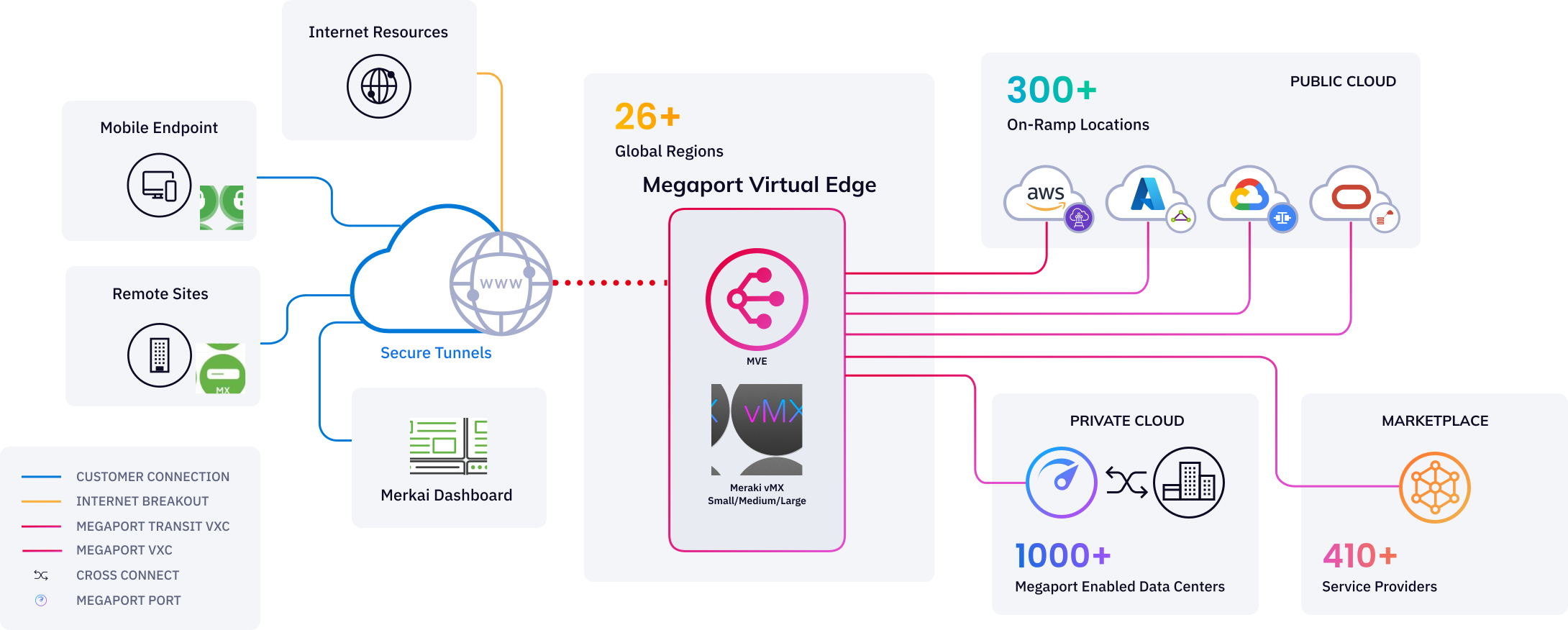
Previously, to connect multiple cloud networks over Meraki SD-WAN, multiple vMXs needed to be deployed in support of each cloud service provider – independently of each other. But Meraki vMX on Megaport Virtual Edge (MVE) centralizes cloud connectivity inside the middle-mile network, so you can easily scale or expand your connectivity to additional cloud service providers based on your requirements – no additional vMXs needed.
This solution uses Megaport Virtual Cross Connects (VXCs) to connect to new destinations in minutes. The Meraki vMX will tag the traffic with a specific VLAN on its LAN-side interface, and the Megaport VXC will deliver that traffic to the destination specified by its VLAN tag. This means multiple destinations on its LAN-side interface can be tied to a single vMX.
With over 130 MVE-enabled locations worldwide, you can deploy your vMX where you need it most for the best possible latency and performance. This enables closer branch-to-cloud access and—combined with blended internet, HA diversity zones, and location-independent deployments—delivers true redundancy.
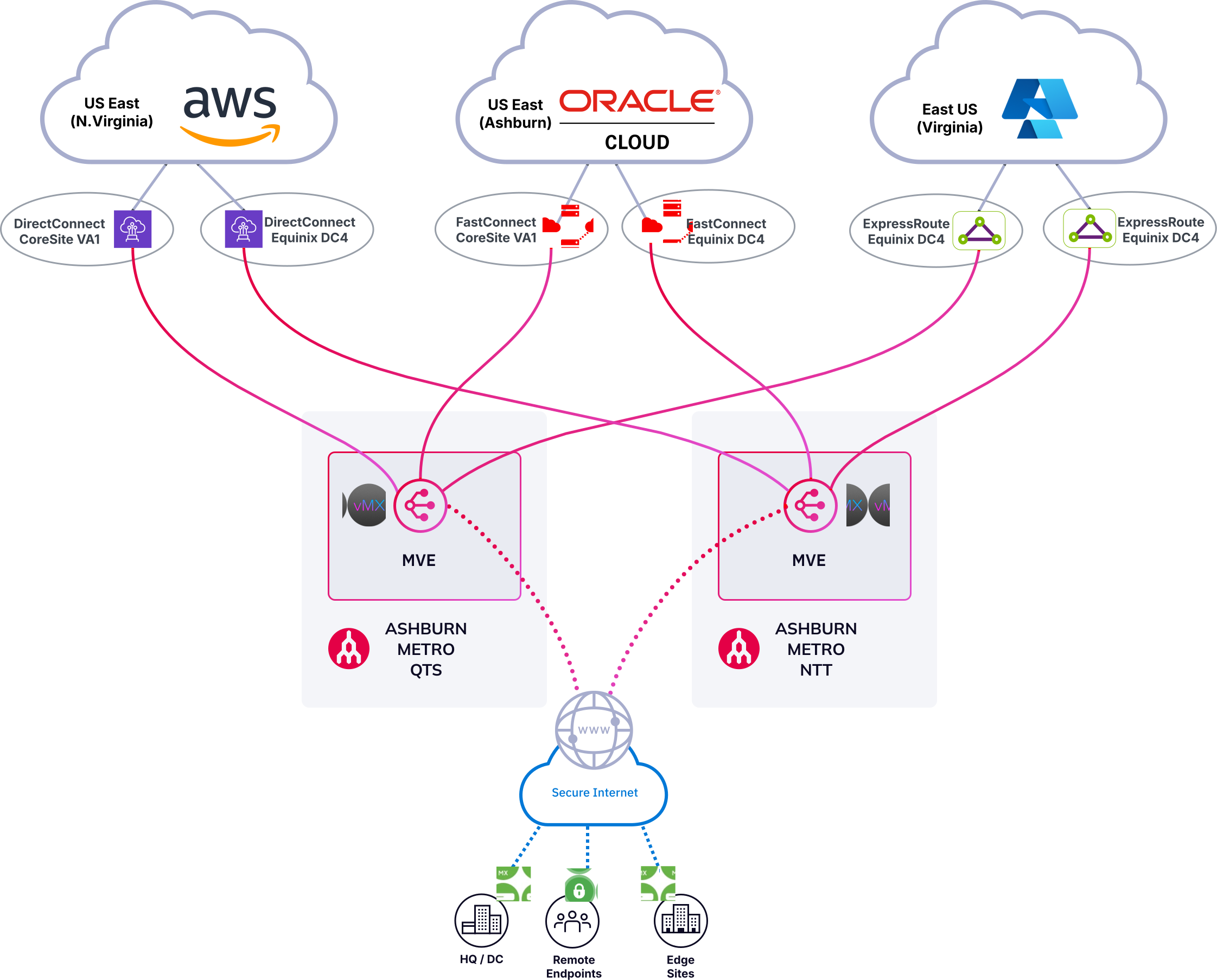
Enterprise-grade multicloud with vMX for the middle mile
Utilizing the flexible nature of Megaport’s Network as a Service, we can combine multiple access methods together and chain them into a true enterprise network solution.
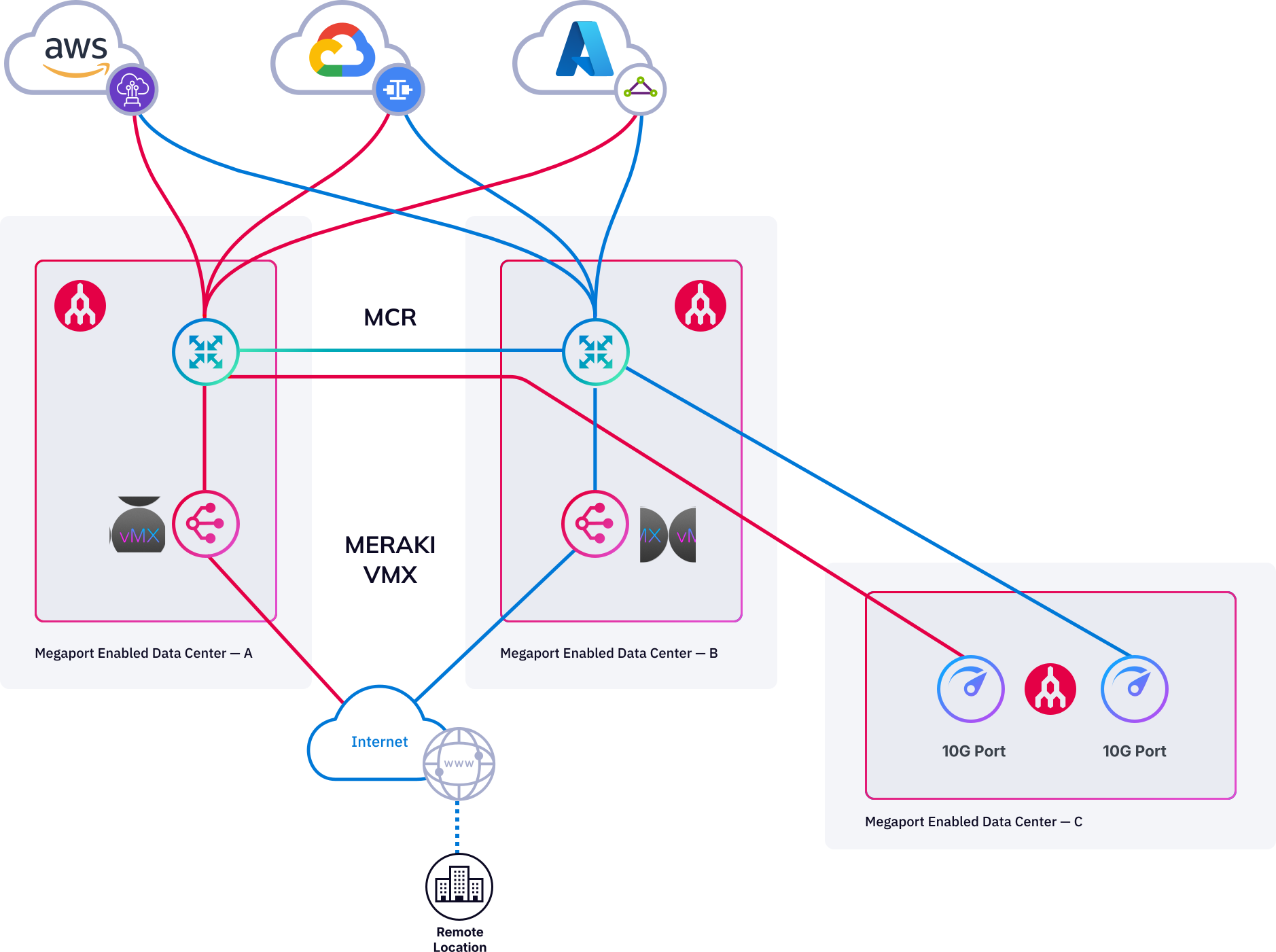
In the below example, we’ll combine Meraki vMX with a Megaport Cloud Router (MCR) and Port to create a distributed cloud access setup. In this scenario, the MCR acts as the distribution router, handling routing between the various cloud environments and on-prem/data-center services while supporting speeds up to 100 Gbps.
Meanwhile, the vMX supports the MCR by providing edge connectivity for remote branches into the cloud network architecture. Alternatively, we could just as easily replace the MCR with an MVE firewall from the preferred vendor to perform east-west traffic inspection and security across multiple cloud providers, on-prem, and branch locations.
Start optimizing your Meraki network today
If you need to improve application performance for remote branches, interconnect multiple clouds, or extend your Meraki SD-WAN network to an array of third-party locations, the general availability of Cisco Meraki with Megaport SDCI is an agile solution for the hybrid cloud era.
To learn more about how to deploy Meraki vMX on Megaport Virtual Edge, visit the Megaport Portal or contact your Cisco account representative. Cisco customers and partners can always find information on Megaport and our integration with Cisco on the Cisco Networking App Marketplace.