





Nine Ways to Connect to Cloud Using Private Connectivity
- Cloud networking
- March 17, 2026
- RSS Feed
By Matt Bero, Solutions Architect
Struggling with cloud complexity? Compare dedicated, partner, and IPsec connections to find the right private connectivity solution.
Multicloud environments bring complexity, and how you connect to your CSPs can make or break performance, cost, and reliability. Here’s how dedicated, partner, and IPsec connections compare — and which might be right for your business.
There are three main methods of connecting to the cloud with private connectivity. Some of these methods contain multiple design options to fit many different use cases.
Table of Contents
Dedicated connections (private):
- Enterprise data center (DC) to cloud service provider (CSP)
- CSP to CSP
Partner connections (private):
3. Enterprise DC to CSP
4. Enterprise DC to two or more CSPs
5. Megaport Cloud Router (MCR) or Megaport Virtual Edge (MVE) to two or more CSPs
6. Enterprise DC to MCR/MVE to CSP
7. Enterprise private DC to Megaport-enabled DC (last-mile private line to Megaport)
8. Enterprise private DC to MCR/MVE to CSP (last-mile IPsec and private line to Megaport)
9. IPsec (encryption over public).
Dedicated connections
Dedicated connections refer to the use of private ports and cross connects to the CSP. These are typically used to accommodate higher speeds but come in 1 GB, 10 GB, 100 GB, and 400GB options.
A dedicated connection to your CSP also enables MACsec and other services you can support within the provider platform. For example, AWS Dedicated connections support higher quotas (50x Private/Public VIF and 4x Transit VIF).
You have two options for provisioning dedicated connections:
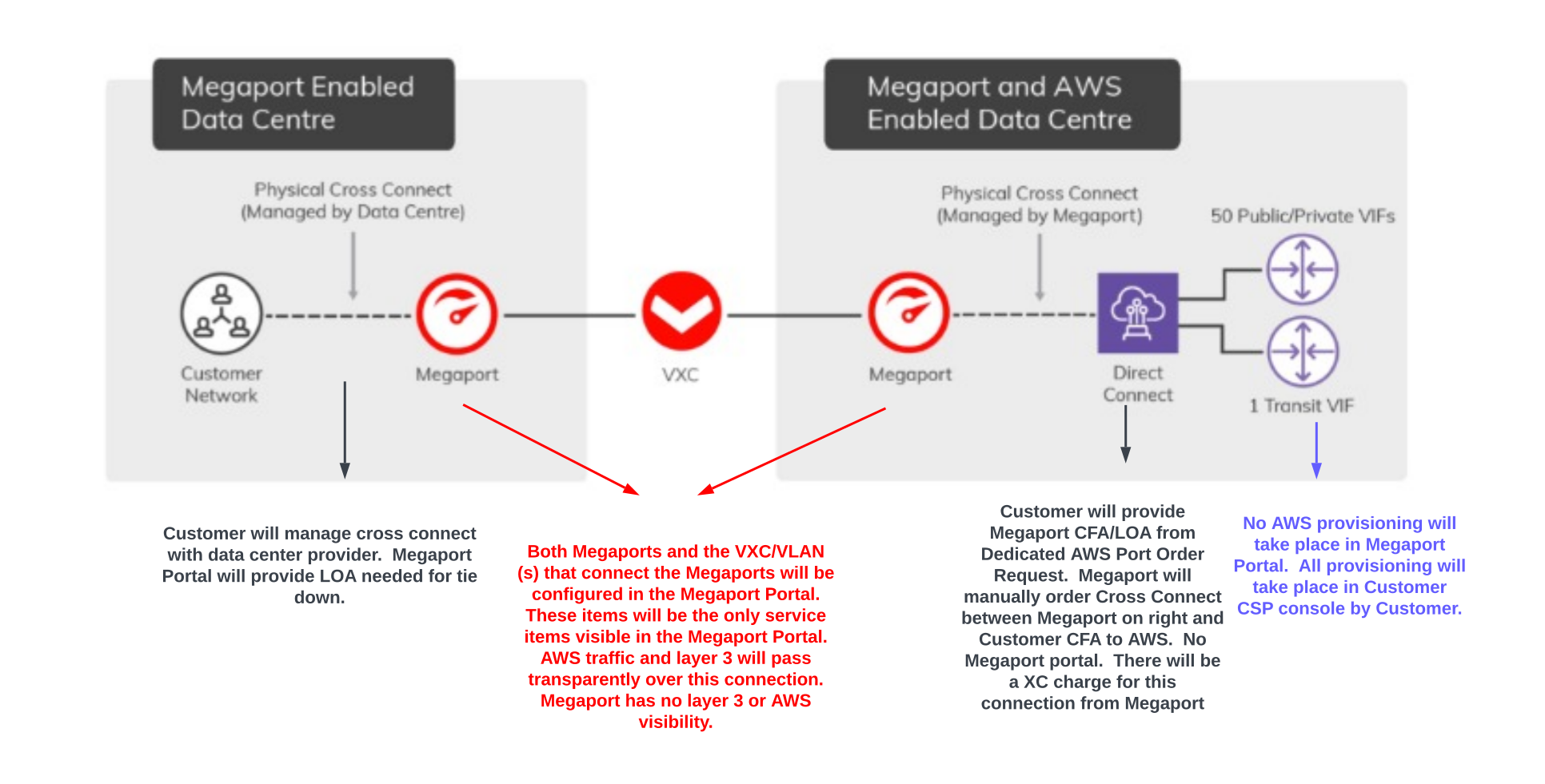
1. Enterprise DC to CSP
Megaport delivers dedicated connections by enabling a port on the enterprise-prem side, and a port in the DC where Megaport shares residency with the CSP. A private virtual cross connect (VXC) is then deployed between the two ports.
The enterprise or Megaport can order the cross connect on the enterprise-prem side, but Megaport will order the cross connect on the side that connects to the CSP.
The finished solution consists of:
- two Megaport ports
- one private VXC
- one dedicated CSP port
- two cross connections (enterprise side and CSP side).
MACsec can be supported by untagging the private VXC between the two ports, and instead allowing the enterprise and CSP switch to encrypt the entire packet.
2. CSP to CSP with MACsec support
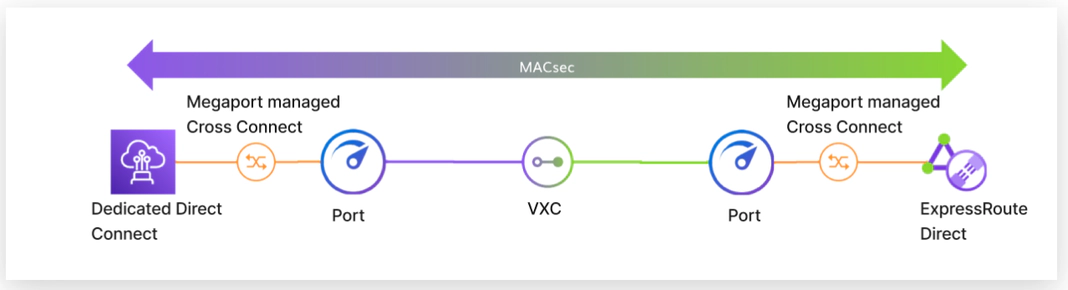
This use case enables MACsec between two CSP connections; MACsec is a Layer 2 encryption protocol that provides security in transit. Since the entire packet is encrypted, there can only be one VXC between the two ports.
Megaport delivers a dedicated connection by enabling a port in the DC where Megaport shares residency with both CSPs. A private VXC is then set between the two ports. Megaport will order the cross connect on the side that connects to the CSP.
If MACsec is not required, MCR is recommended to scale routing and provide multiple enabled CSP connections. See the sections below that cover the use of MCR or MVE to enable multicloud connections.
The finished solution consists of:
- two Megaport ports
- one private VXC
- two CSP dedicated ports
- two cross connections (enterprise side and CSP side).
Partner connections
Partner connections are typically the most commonly used, thanks to their flexible speed tiers and immediate provisioning.
Speed tiers range from 50 MB to 50 GB with most CSPs. You can use partner connections to aggregate multiple connections to one or more CSPs from the same port, MCR, or MVE, as well as manage any oversubscription to conserve bandwidth costs. Each circuit will have its set speed but multiple paths are used to send traffic to the intended location.
The advantages of partner connections are:
- smaller bandwidth sizes ranging from 50 MB to 25 GB
- API integrations to automate connection ordering and setup
- no waiting for cross connections or transport with pre-established physical connections to CSPs.
MACsec can not be used on these types of connections. If MACsec is a requirement, a dedicated connection is needed.
The below examples cover six key use cases, however more advanced configurations can be implemented. Megaport and similar modular platforms allow you to deploy services like Lego blocks, customizing and scaling your setup in line with changing needs.
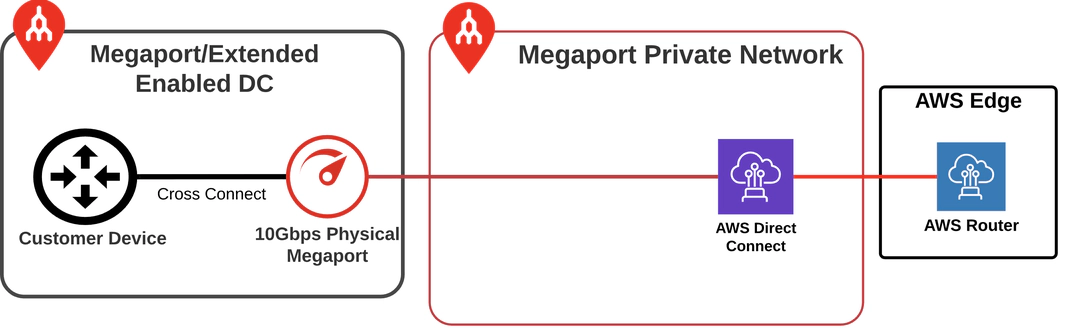
3. Enterprise data center to CSP
This use case focuses on connecting an enterprise’s DC to a CSP via Megaport. Enterprises with a presence in one of Megaport’s 1,200 + DCs can leverage various types of cross connections, including standard, campus, fiber, and metro cross connects, depending on the DC provider.
Once a cross connection is established between the enterprise’s on-prem equipment and Megaport, private, secure connectivity to a single CSP is enabled. Megaport acts as the Layer 2 transport, and both the enterprise and CSP routers establish BGP for dynamic routing.
For enterprises not located within a Megaport-enabled DC, a local loop can be terminated at a nearby Megaport-enabled location, connecting the enterprise to Megaport’s network. (See the “Enterprise private DC to Megaport-enabled DC” section for more details on this setup.)
Each CSP establishes connections differently, but the Megaport Portal works seamlessly with all of them and offers documentation for each CSP. Your Megaport sales rep can also walk you through the process.
Megaport provides two separate connections to the CSP at every location, which enables you to create a Highly Available (HA) connection. To implement an HA design, you simply duplicate the setup for redundancy and reliability.
The most unique deployment is with Azure, where each ExpressRoute includes two connections, fulfilling Microsoft’s SLA requirements. Enterprises can use up to two connections for each Azure ExpressRoute, and these can be terminated on the same or different routers. Azure supports Q-in-Q VLAN tagging, though Megaport offers alternatives for customers whose routers do not support this feature.
A critical decision is which on-ramp to use. Since most CSPs (excluding Oracle) provide global services, you can either connect to the on-ramp close to your DC or closer to the CSP’s compute region. Megaport simplifies this decision by providing latency data and SLAs, helping enterprises make an informed choice.
A critical decision is choosing the on-ramp you need to connect to your CSP. Since most CSPs (excluding Oracle) offer global services, you can either connect to an on-ramp close to your data center (DC) or closer to the CSP’s compute region.
Additionally, choosing the right backbone between your DC and the CSP is crucial. To simplify both decisions, Megaport provides latency data and SLAs, helping enterprises make informed choices on both the on-ramp and backbone that best suit their needs.
The finished solution consists of (non-HA):
- one Megaport port
- one cloud VXC
- one cross connection (enterprise side).
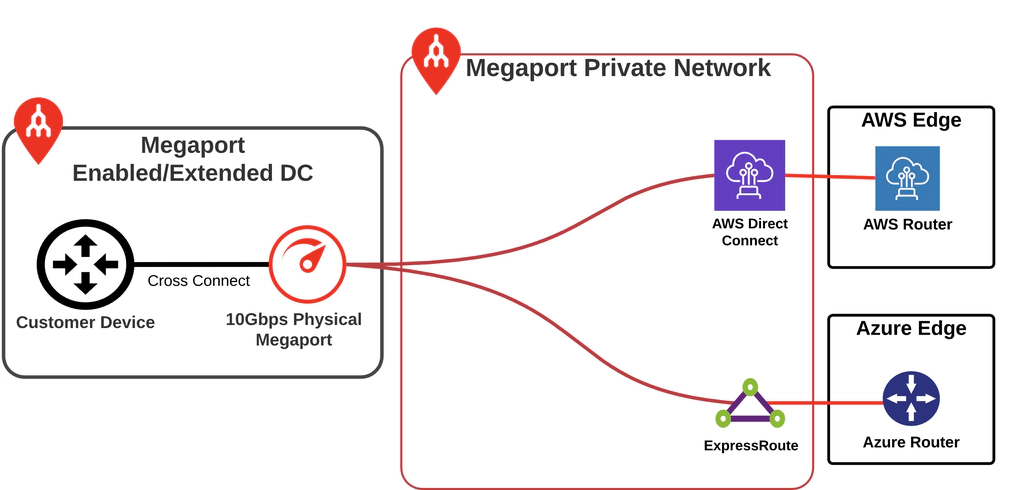
4. Enterprise DC to two or more CSPs
As enterprises adopt cloud services, it’s common to add more CSPs to take advantage of each one’s unique benefits. The good news is that Megaport services are multi-use so you can easily connect multiple CSPs to your ports, Megaport Cloud Router (MCR), or Megaport Virtual Edge (MVE).
One common use case is connecting multiple CSPs through a single Megaport port. In this setup, Megaport enables a VLAN that needs to be configured as a sub-interface on the enterprise’s router. Typically, this is an 802.1Q tag, but for specific services like Azure, it can also include Q-in-Q tagging.
With this configuration, all traffic—including CSP-to-CSP traffic—flows to the enterprise’s router or data center. This works well if the enterprise’s data center is close to the CSP locations. However, if the data center is farther away, it can add latency.
Additionally, some enterprises don’t want CSP-to-CSP traffic to hit their core routers. To address these concerns, deploying a virtual router can help optimize traffic and avoid overloading the core network.
The finished solution consists of (non-HA):
- one Megaport port
- two cloud VXCs
- one cross connection (enterprise side).
5. MCR or MVE to two or more CSPs
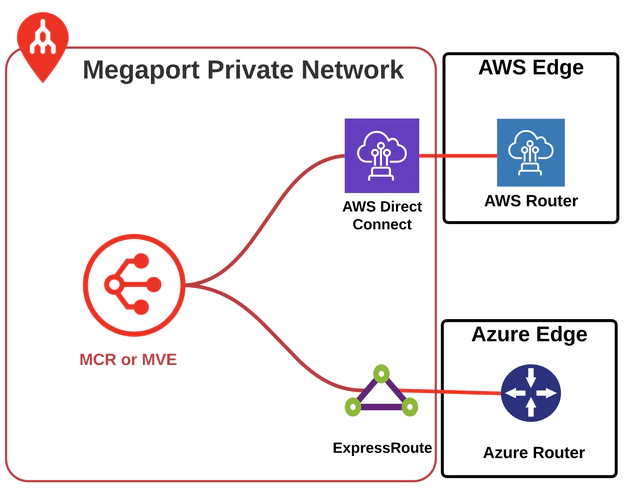
Many cloud-native companies, which may not have a data center presence, still use multiple CSPs for their operations. Megaport enables optimized private connectivity between CSPs with Megaport Cloud Router (MCR) and Megaport Virtual Edge (MVE).
Both MCR and MVE are virtual routers hosted on Megaport compute. They are deployed in metros where we connect to the CSPs, ensuring very low latency between them.
Megaport Cloud Router (MCR)
The MCR includes the router license so you can deploy a cloud router in just 60 seconds. BGP configuration can also be done directly in the Megaport portal.
The MCR supports a range of features, including BGP, Static routes, NAT, IPSEC, and ACL configurations. Throughput ranges from 1 GB to 100 GB.
Megaport Virtual Edge (MVE)
The MVE follows a Bring Your Own License (BYOL) model and supports a variety of vendors such as Cisco, Palo Alto Networks, Fortinet, Arista, Aruba, Juniper, and more. It’s commonly used when enterprises need advanced routing, firewall features, or SD-WAN/IPEC capabilities, or when a specific vendor is preferred. Throughput for the MVE ranges from 500 MB to 100 GB.
Placement of the virtual router is typically in the same metro where Megaport connects to the CSPs, allowing for low-latency, private connectivity (sub 1ms-2ms) between multiple CSPs. Enterprises often deploy virtual routers to support different environments, such as Dev, Pre-Production, and Production.
Common traffic types across these connections include:
- API calls
- data transfers
- database queries.
These services are mission-critical, requiring private connections supported by an SLA, low latency, and high availability.
Megaport uses diverse devices in every metro to provide both device and maintenance window diversity. This same setup is mirrored at CSP on-ramps, allowing you to design a network with diversity at every connection point.
The finished solution consists of (non-HA):
- one Megaport MCR or MVE
- two cloud VXCs.
6. Enterprise DC to MCR/MVE to CSP
As enterprises expand their hybrid cloud environments, adding more CSPs introduces additional design considerations.
The two main factors to address are:
- keeping CSP-to-CSP traffic local to the region
- optimizing your on-prem router to handle the increased traffic.
A typical scenario would be the need to keep CSP-to-CSP traffic within specific regions when the enterprise DC isn’t geographically close to those regions. For example, an enterprise with a DC in the central US may need to connect to CSPs in both the East and West regions.
Traditionally, this would require setting up physical DCs and routers on both coasts and connecting them back to a central DC using long-haul circuits. But while this ensures low-latency CSP-to-CSP connectivity, it’s a costly and time-consuming approach, requiring significant infrastructure and extended setup times.
A streamlined solution with Megaport
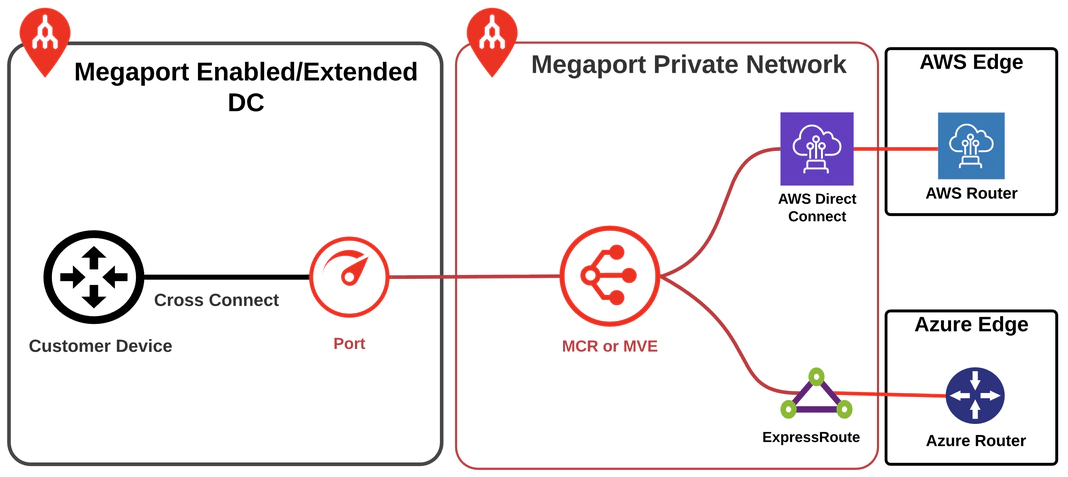
Megaport offers a more efficient solution using MCR or MVE. By deploying these virtual routers in the necessary regions for inter-CSP connectivity, traffic can be routed back to the enterprise’s on-prem DC via Megaport’s private backbone. This approach eliminates the need for additional DC space, long-haul private connections, and the long waiting times typically associated with traditional setups.
With Megaport’s virtual routers and private backbone, enterprises can achieve their required connectivity immediately and scale as needed. Templates can also be created to replicate the same setup across other regions in the US or globally, offering greater flexibility.
Another advantage of this approach is the ability to offload CSP routing to the MCR or MVE. These virtual routers, deployed in DCs close to the CSPs, peer with the enterprise’s on-prem router and each CSP.
The MCR or MVE acts as the gateway to the CSPs, sending routes to the appropriate locations and offloading traffic from the enterprise’s core network. This solution can also be replicated across different regions or globally, streamlining network management and improving scalability.
The finished solution consists of (non-HA):
- one Megaport MCR or MVE
- one private VXC between port and MCR/MVE
- two cloud VXCs.
7. Enterprise private DC to Megaport-enabled DC (last-mile private line to Megaport)
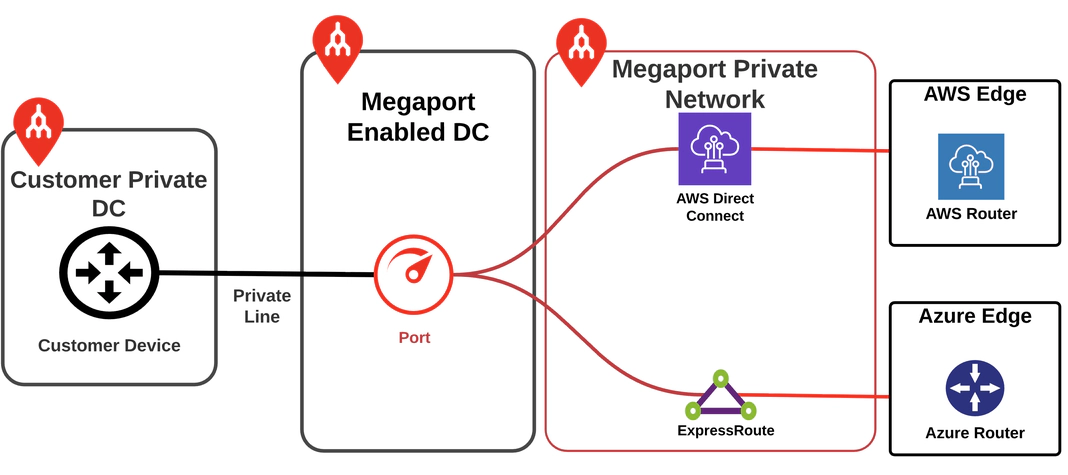
Some enterprises have a private DC located on their corporate campus or in a facility not directly connected to a Megaport-enabled DC. These locations may still require private connectivity to the nearest Megaport-enabled data center for access to Megaport’s network.
Megaport-enabled locations are the preferred points for terminating private lines, as they host Megaport equipment and allow for a physical cross connect between the carrier and Megaport. In this scenario, the enterprise does not need to have its own equipment in the DC. Either the private line provider or Megaport can arrange the cross connect, granting the enterprise access to all locations on the Megaport private network.
Once connected to Megaport’s network, the enterprise can easily add multiple services, including connections to CSPs, MCRs, and MVEs, enhancing their cloud connectivity and network flexibility.
The finished solution consists of (non-HA):
- one private line (acquired through a third party but enabled by Megaport)
- one Megaport port
- two cloud VXCs.
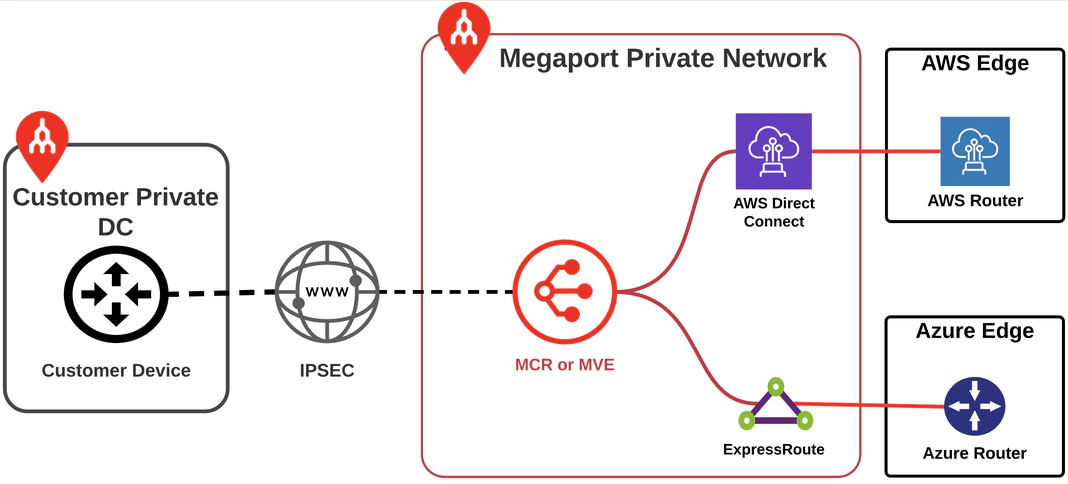
8. Enterprise private DC to MCR/MVE to CSP (last-mile IPsec to Megaport)
There are scenarios where enterprise locations or individual users need to access CSP resources, and IPsec can support the last-mile connection. The key to making this work effectively is to limit the length of the IPsec tunnel and convert it to private transport as close to the end users as possible.
Both MCR and MVE support IPsec tunnels. If you need more than 10 or 20 tunnels, I recommend using an MVE, as managing IPsec tunnels is more scalable on an SD-WAN router. The MCR is a great tool for just a few site-to-site IPSEC tunnels.
The placement of the MCR or MVE should be as close to the end users or locations needing CSP access as possible. Since these are virtual devices, they can be deployed in several locations within a region to minimize the length of the IPsec tunnel.
Many enterprises use IPsec directly over the internet to the CSP. These tunnels can span a metro, regional, or even continental distance, depending on the user’s location and the CSP region they need to access.
For single CSP use cases that travel short distances, this can work, but as you scale to multiple CSPs and regions, the complexity increases. When you consider the lack of SLA, inconsistent network performance (latency and delivery), and the cost savings from lower egress with a private CSP connection, the value of Megaport’s solution becomes clear.
The MCR or MVE can also serve as an aggregation point for multiple CSPs, reducing the complexity of managing tens or even hundreds of tunnels to each CSP’s front door. Once traffic reaches the MCR or MVE, it rides the Megaport private backbone, connecting to the CSP where the enterprise needs access.
This setup scales up to 50 GB, enabling multiple users to share the same transport. Egress costs are also reduced for many CSPs as traffic hits the private side of the CSP network.
The result is a more reliable connection to the CSP, an easier way to manage the connection, the ability to scale bandwidth to the CSP, and reduced egress costs out of the CSP.
The finished solution consists of (Non HA):
- one Megaport MCR or MVE
- one or two internet VXCs (some MVE vendors require a managed internet connection)
- two cloud VXCs.
9. IPsec (encryption over public)
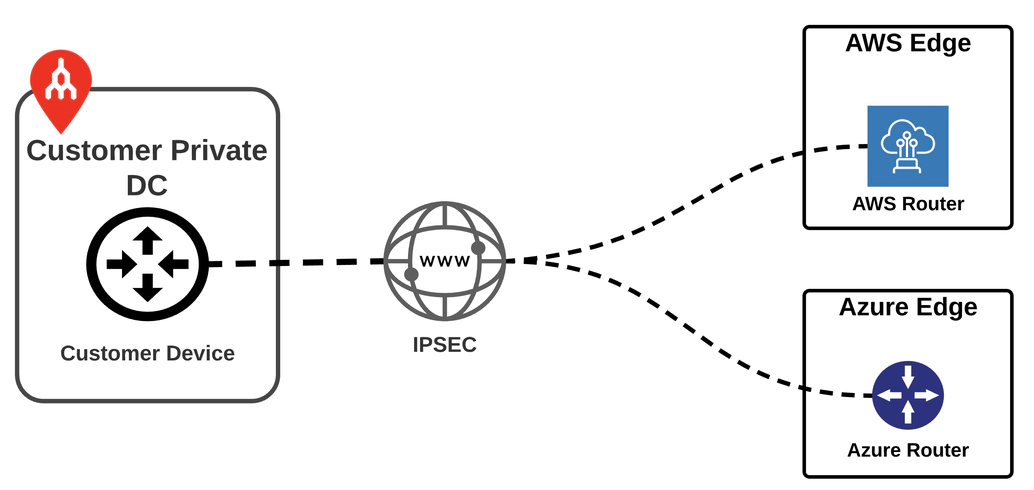
Generally speaking, this setup falls outside of what Megaport provides, except in scenarios where the MVE is used. The main purpose here is to offer a point of reference for another way to connect to the CSP.
In many cases, connectivity to the CSP starts with this design, but it has limitations. IPsec typically scales to 1.25 GB, which, for enterprise-grade services, simply isn’t sufficient. AWS has recently introduced 5 GB support for IPsec, but it can scale up to 25 GB with a Direct Connect Hosted Connection and 100 GB with a Dedicated Connection.
When you factor in the lack of an SLA, higher egress costs, and the complexity of managing tens or even hundreds of tunnels to multiple CSPs, this setup is best suited for smaller-scale or backup connections to CSPs.
Choose your adventure
If you’re interested in learning more about these services or getting advice on which method is best for your business, please reach out to us. We have a team of talented sales professionals who can guide you through the options. Our focus on network, CSP, and compute allows us to help you design the best solution to meet your needs.
Since our services are modular, we can address short-term problems now and add services as your needs evolve. The key is to get started today, simplifying your network and expanding your Megaport deployment as your business grows.