






Migrate Your On-premises to the Cloud: A Step-by-Step Guide
- Cloud networking
- March 9, 2026
- RSS Feed
By Dan Pfyl, Solutions Architect
Is it time to migrate your data center applications to the cloud? Get key considerations and a step-by-step migration path.
Migrating your on-premises data center to the cloud can seem like a daunting task, from deciding on the right cloud deployment model to ensuring that your network connectivity is secure and scalable.
For many companies, the question isn’t whether to migrate, but how to do it efficiently and with minimal disruption. Getting your migration right is critical to reducing costs, scaling operations, and improving security.
In this guide, we’ll cover top considerations for migrating your data and applications to the cloud, and explore how Megaport’s Network as a Service (NaaS) platform can help simplify the process – providing reliable, secure, and on-demand connectivity across 1,200 + data centers globally.
Table of Contents
Why migrate from on-premises to cloud?
Whether it’s a mandate from your C-suite or just a company initiative, most of the key reasons for migrating your data to one or multiple clouds are:
- Cost reduction: The cloud eliminates the need for upfront hardware purchases or refresh, reduces costs associated with power, cooling, and maintenance, and shifts expenses to a pay-as-you-go operational model.
- Scalability and agility: Companies can quickly and easily scale computing resources up or down to meet fluctuating demand, allowing them to respond faster to market changes and business growth.
- Enhanced collaboration and accessibility: Cloud-based services allow employees to access applications and data from anywhere, which improves productivity and facilitates remote work and collaboration across different locations.
- Improved security and compliance: Cloud providers invest heavily in security measures and expertise, often providing a higher level of security than many individual companies can achieve on their own.
- Disaster recovery and business continuity: The cloud provides robust disaster recovery capabilities, ensuring that operations can continue with minimal downtime and data loss in the event of an unforeseen disruption.
- Faster innovation: Migrating to the cloud lets companies innovate faster by providing easier access to advanced technologies like artificial intelligence and machine learning, and by streamlining the deployment of new features.
- Streamlined IT operations: By outsourcing infrastructure management, IT teams are freed from routine data center maintenance and can focus on more valuable, strategic projects.
Where hybrid cloud fits
A hybrid cloud deployment can offer the best of both worlds: keeping sensitive data and stable workloads on your private, controlled infrastructure while still allowing you to use the public cloud’s massive scale and cost-effectiveness for variable demands (like holiday spikes) or less critical tasks. By balancing security and control with agility and scalability, hybrid cloud is a flexible, cost-effective, secure, and resilient choice for many organizations.
How to migrate from on-premises to cloud
Migrating data from on-premises infrastructure to the cloud involves a structured, multi-phase approach, beginning with assessment and planning and ending with monitoring and optimization. A successful cloud migration typically follows these core steps.
1. Assessment and planning
- Define goals: Clearly outline business objectives, such as cost reduction, improved scalability, or enhanced security.
- Inventory and audit: Conduct a thorough assessment of your existing IT environment, including all data, applications, servers, and their interdependencies. Identify and document data types, size, structure, and regulatory requirements (e.g. HIPAA, GDPR).
- Choose a strategy: Decide on a migration approach for each application. Common “R” strategies include rehosting (lift and shift), refactoring (minimal modifications), and rearchitecting (redesigning for cloud-native features).
- Select a cloud provider: Choose your cloud service provider/s based on cost, services offered, security features, and compatibility with your systems.
- Plan security and compliance: Review required security measures, including encryption (at rest and in transit) and Identity and Access Management (IAM) controls, and ensure all compliance requirements are met.
2. Preparation and testing
- Cleanse data: Before migration, clean up your data by removing duplicates, correcting inconsistencies, and standardizing formats.
- Set up the cloud environment: Configure your target cloud infrastructure including network settings, storage, and access permissions.
- Conduct pilot migration: Perform a small-scale, non-critical test migration with a subset of your data and applications. This helps identify potential issues and refine your migration plan.
- Create a rollback plan: Develop a contingency and rollback plan in case of unexpected issues or failures during the actual migration process.
3. Execution
- Schedule migration: Plan the migration during off-peak hours to minimize business disruption.
- Execute data migration: Use appropriate tools (such as AWS Database Migration Service, Azure Data Box, or Google Storage Transfer Service) to securely transfer your data. This can be done incrementally or all at once, depending on your plan.
- Migrate applications: Move applications to the cloud and update all necessary configurations, such as DNS records, to route traffic to the new cloud environment.
4. Validation and optimization
- Validate integrity: After migration, rigorously verify data integrity and consistency using checksums and record counts to ensure nothing was lost or corrupted.
- Monitor performance: Implement robust monitoring solutions (like Amazon CloudWatch or Azure Monitor) to track performance, availability, and costs in your new cloud environment.
- Optimize costs and performance: Continuously optimize resource usage to balance performance and costs (e.g. right-sizing instances, using auto-scaling).
- Train users: Provide training and updated documentation to end users to ensure smooth adoption of your new systems.
Options for connecting to cloud
Once you’re migrated, reliable cloud connectivity will be essential to your business operations.
Common cloud connectivity types include public internet connections (often via a VPN), private dedicated connections (like AWS Direct Connect, Azure ExpressRoute, or Google Interconnect), and SD-WAN. Each method offers different levels of performance, security, and cost, allowing businesses to choose the best fit for their specific needs.
Public internet connection
- Virtual Private Network (VPN): Creates an encrypted tunnel over the public internet for secure, affordable remote access or site-to-site connections.
- Pros: Easy to set up, affordable, and flexible.
- Cons: Performance can be inconsistent with no guaranteed quality of service, and bandwidth can be unreliable and complicated to scale.
Private dedicated connections
- Direct Connect/ExpressRoute/Google Interconnect: Provides a dedicated, private network link directly from your on-prem to the cloud provider’s network, bypassing the public internet.
- Pros: Offers higher bandwidth, lower latency, and more consistent performance than a VPN.
- Cons: More expensive and complex to set up than a VPN.
Software-defined networking
- SD-WAN: Manages and optimizes traffic across various public and private connectivity options, allowing you to route traffic dynamically based on application needs.
- Pros: Provides greater control, visibility, and the ability to use the most efficient path for different types of traffic.
- Cons: Adds complexity to network management.
- SASE (Secure Access Services Edge): A cloud-native approach that combines networking and security functions into a single, cloud-delivered service.
- Pros: Enhances security through identity-based policies, simplifies complex network architectures.
- Cons: High upfront implementation costs, the need for specialized expertise, potential vendor lock-in, and the requirement for significant IT culture change to break down silos between networking and security teams.
Which option should I choose?
If you manage large enterprise workloads, you’ll want dedicated, private connectivity with consistent bandwidth, low latency, and predictable costs. In this case, a private dedicated connection will be best for your deployment.
If rapid deployment and flexibility is your priority and some internet variability is acceptable, then a VPN connection is worth trying.
The connectivity model you choose should be based on the experience you want your user/customer to have in relation to the applications you’re running in the cloud.
Migrating on-premises to cloud with Megaport
Understanding connectivity and deployment models is critical, whether moving from on-premises to the cloud or between clouds.
Using a NaaS provider like Megaport gives you the control often missing from standalone environments, creating a flexible network underlay across all workloads. Megaport lets you move workloads quickly, reduce latency with private links, avoid costly cloud egress charges, and spin up new connections in minutes. It also provides access to over 1,200 data centers and hundreds of cloud and managed service providers worldwide.
Below are a few deployments that Megaport can help with.
Data center to cloud
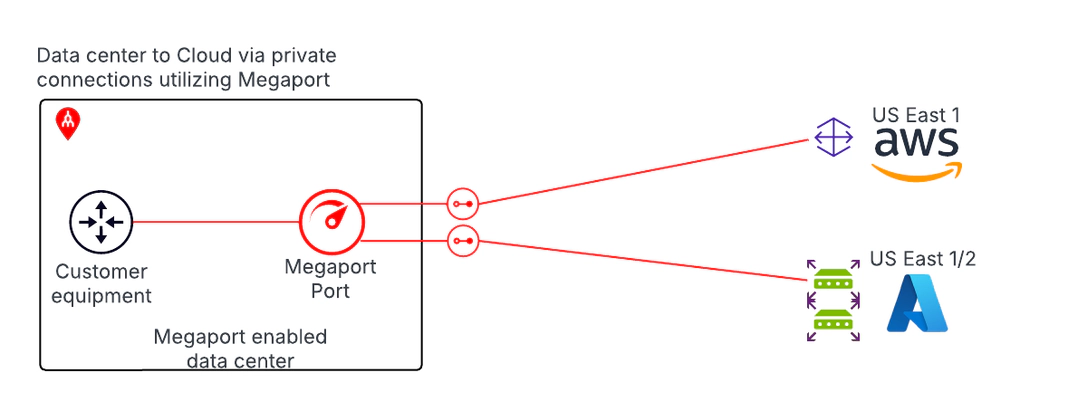
In this deployment model, data moves directly between the on-premises data center and one or more cloud service providers over a private connection that bypasses the public internet. This approach delivers higher bandwidth, lower and more consistent latency, and improved reliability, while also enhancing security by keeping traffic off the internet.
Many enterprises also see cost benefits due to lower egress charges compared to internet-based connectivity. When the data center needs to remain connected to the cloud during or after migration, this model supports a hybrid cloud architecture, with BGP peering established directly between the customer data center and the cloud provider. If traffic needs to move between cloud providers, it must hairpin back through the data center.
Cloud to cloud
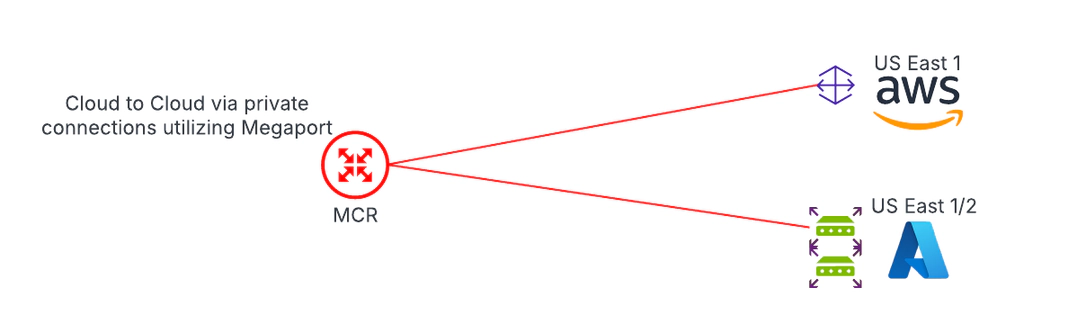
This deployment model facilitates direct data transfer between cloud providers without routing traffic through the on-premises data center. It’s typically used when data no longer originates from (or needs to return to) the data center.
For example, applications may run in one cloud while the data they require has been migrated to a different cloud provider, allowing workloads to access that data efficiently without involving on-premises infrastructure.
Hybrid cloud
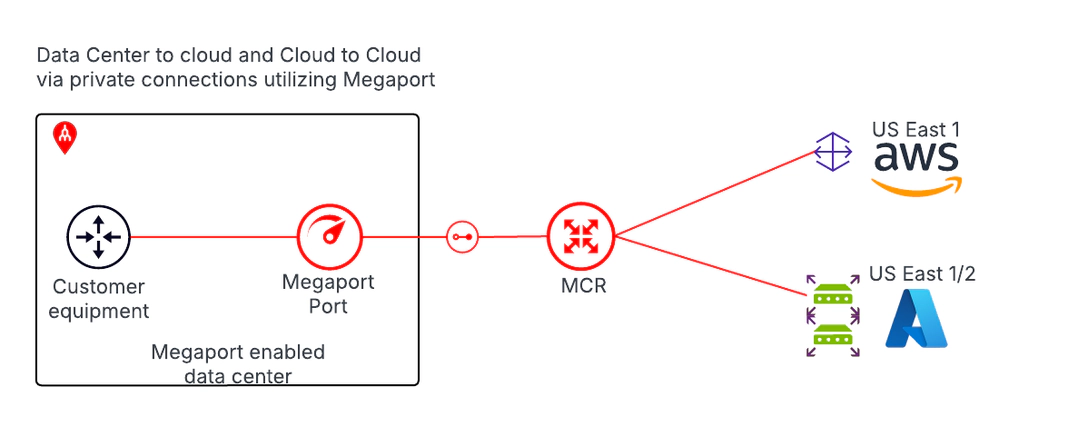
This deployment model supports data transfer between multiple clouds while maintaining connectivity back to the on-premises data center. It’s used when workloads in the cloud need to access data in other clouds while some data must also flow back to on-prem systems.
This hybrid compute approach is common when applications run in the cloud but still rely on legacy systems—such as an AS400—in the company’s private data center, or when data that was once on-premises has been migrated to a different cloud provider than the one hosting the application.
A strategic investment
Cloud migration decisions shouldn’t be driven by cost alone. The cheapest option on paper can quickly become the most expensive if it limits performance, resilience, or future flexibility.
Treat cloud migration as a strategic investment, not a cost-cutting exercise. The right deployment model is the one that aligns your architecture, connectivity, and budget with the business outcomes you’re trying to achieve, from scalability and reliability to compliance or long-term agility.