





Introducing Megaport Webhooks: Your Systems Act Before Your Team Does
Learn how Megaport Webhooks deliver real-time events to your tools, enabling faster responses, automated workflows, and less manual work.
The tools that run modern infrastructure operations, SIEM platforms, IAM solutions, and CI/CD pipelines are built to act on events as they happen. With these tools, finding out what has changed on your account requires either polling the API on a schedule, or waiting for an email response.
By the time information reaches your tooling, the event that triggered it already happened. And sitting invisibly behind every polling integration is building and maintenance, rate limit management, scheduler drift, and bespoke logic.
Megaport Webhooks change this delivery model. Instead of your systems having to ask what changed, we tell them the moment it happens — across your network, your orders, your billing, and your account — helping you optimize your tooling and APIs.
Now, your systems can act on Megaport events before your team even sees them.
Detect changes the moment they happen
Megaport Webhooks send real-time events to your systems whenever something changes in your Megaport environment. A five-minute polling gap becomes detection in seconds. Your systems go from fast to fully reactive.
We fire network events the instant a service changes state across Ports, VXCs, MCRs, MVEs, and MegaIX connections. BGP session events include the peer ASN and peer IP, giving your team context to investigate before anyone raises a ticket. Flap suppression sends one clean alert and one clean recovery instead of repeated alerts from flapping links.
The same principle applies to planned and unplanned disruptions. Events fire when maintenance is scheduled, rescheduled, completed, or cancelled, as well as when an outage starts, is updated, or is resolved.
Your tooling knows the state of your network before your inbox does.
Your tooling acts, so you don’t have to watch
The value of real-time events is not simply knowing what happened — it’s enabling your configured tooling to act immediately.
We deliver the payload the moment an event occurs. What your systems do next depends on how you have wired them up. Once that configuration is in place, workflows can begin automatically, including incidents raised, records updated, alerts fired, and recoveries confirmed. This reduces response times and manual work, without a human ever having to watch a screen.
Instead of finding a raw notification in an inbox, your team responds to a workflow already in motion. And automation is just one benefit; Webhooks also reduce the technical overhead of keeping your systems up to date.
Cut the overhead of API polling
Every polling integration your team has built carries hidden maintenance costs like rate limit management, scheduler drift, and missed events in the gap between cycles. Webhooks replace all of it with one endpoint, configured once, to supercharge your APIs. Push-based delivery with automatic retries absorbs short outages on your side without losing events.
Order events fire when you provision or terminate a service, keeping your CMDB current and stopping cost allocation the moment a service terminates. Billing and payment events also feed your finance tooling directly, so there’s no need to manually update your records in step with Megaport.
And the same principle now applies for teams adding AI agents to their operations. An AI agent polling for network state burns through tokens on queries that mostly return nothing new. But configuration webhooks and real events can trigger those agents directly. This shift toward event-driven infrastructure gives you more efficient, AI-ready tooling.
See it in action
The following scenarios show what’s possible when your tooling is configured to act on webhook events. Megaport delivers the payload to your endpoint, but what your systems do with it depends on how you have built your integrations.
Scenario 1: Respond proactively to a network incident
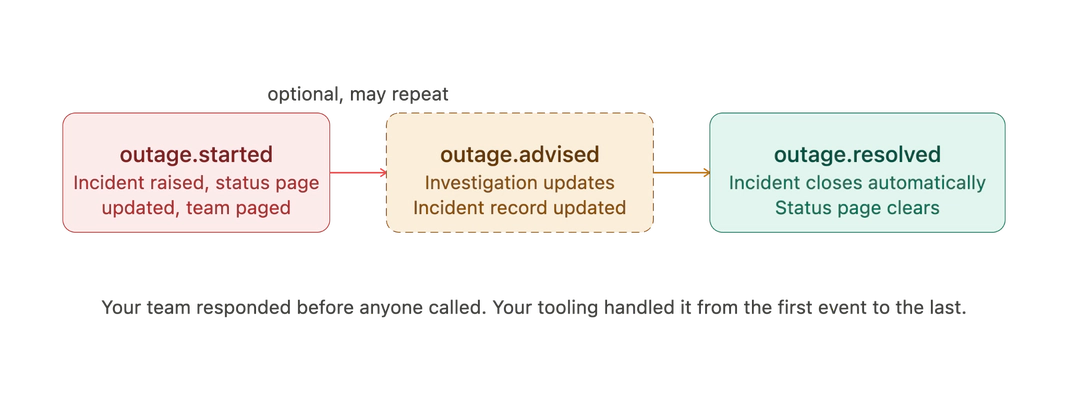
At 3 a.m., an unplanned service disruption affects a path through your network.
Step 1. Megaport detects and logs the outage. outage.started fires immediately with outage reference, affected services, and timestamp.
Step 2. The payload hits your configured endpoint. If your IT service management (ITSM) tool is wired to act on it, an incident record is raised. If your alerting tool is connected, your on-call team is paged with the context we have at that moment.
Step 3. As the investigation progresses, outage.advised fires with updates. Your incident record reflects the latest information without you needing to copy from emails.
Step 4. We resolve the outage, and outage.resolved fires. Your configured tooling closes the incident and notifies your team.
Your team responds to an already-actioned workflow, not a notification sitting in an inbox.
Scenario 2: Know about a maintenance window before your inbox does
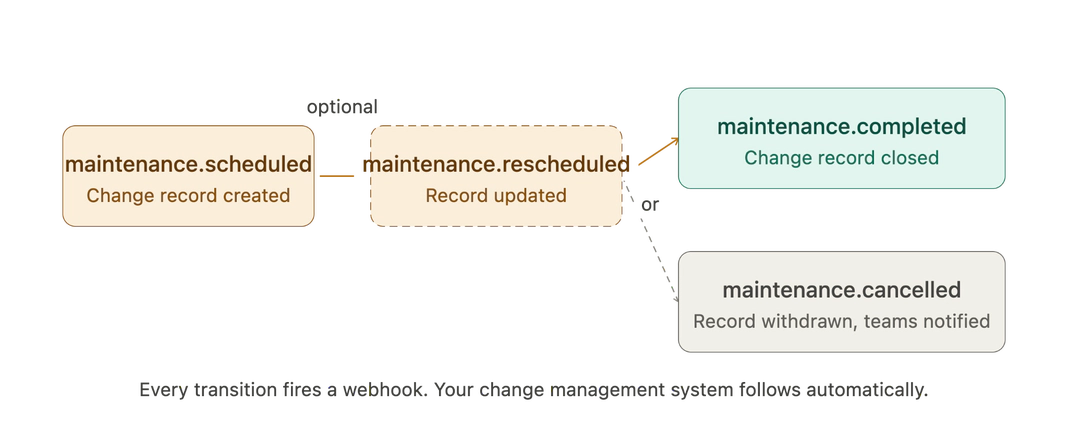
Megaport has scheduled maintenance on a path affecting your services.
Step 1. maintenance.scheduled fires with the window reference, affected services, and start and end times. If your change management system is configured to receive it, a change record is created before anyone has opened their email.
Step 2. Plans change. We reschedule the window. maintenance.rescheduled fires. Your change record can update automatically. Your teams get the new window.
Step 3. Maintenance finishes. maintenance.completed fires. Your change record closes.
If the maintenance is cancelled, maintenance.cancelled fires and the record is withdrawn. Every state change generates a webhook. Your tooling follows the lifecycle automatically, provided it is built to do so.
Scenario 3: Manage partner-governed order approvals
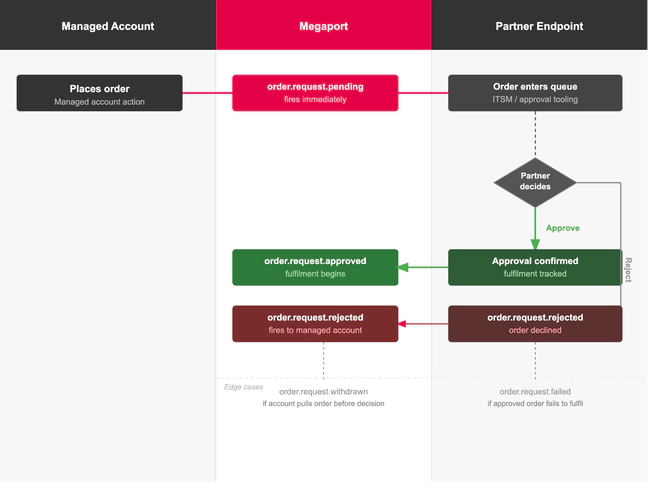
Some partners require that orders placed by their managed accounts go through an approval step before fulfilment begins. Rather than monitoring the Megaport Portal for pending orders, partners can run that approval queue through their own tooling.
Step 1. A managed account places an order. Megaport pushes order.request.pending to the partner’s configured endpoint. If the partner’s ITSM or approval tooling is wired to act on it, the order enters its workflow immediately.
Step 2. The partner approves or rejects the request in its own system. order.request.approved fires when fulfilment begins. order.request.rejected fires if the order is declined.
Step 3. If the managed account withdraws the order before a decision is made, order.request.withdrawn fires. If an approved order fails to fulfil, order.request.failed fires.
The partner runs order governance from its own systems. Approvals are queued, decided, and tracked automatically, with a full audit trail of who ordered what and how it was actioned.
What’s next
Your network team is under the same pressure as the rest of the business: Do more with the same resources. Megaport Webhooks helps your tooling work harder so your team can focus. more on what matters.
Megaport helps you build toward a network your team can direct, not just navigate. A network that pushes events is one your systems can respond to without a human in the middle, and webhooks are a key layer of this type of network.
To get started, set up your first endpoint in the Megaport Portal and subscribe to the event types you need. Megaport Webhooks will then start delivering events. Company Admins and Technical Admins have access by default, and each company can configure up to 10 endpoints. No support ticket is required.
View the full event reference and set up your first webhook.