




Introducing Megaport CLI: Provision and Automate Your Network from the Terminal and Pipeline
Bring network provisioning into your workflow with Megaport CLI, built for repeatable changes from the terminal, scripts, and CI/CD pipelines.
When everything runs through a pipeline, changes are reviewable, repeatable, and consistent from staging to production. Your application code ships that way. Your cloud resources provision that way.
Then you need a Megaport connection. So you open the Portal, and step outside the pipeline.
Until now, the options for scripted, pipeline-driven provisioning have been to build against the raw API, or adopt Terraform for everything.
Now, the Megaport CLI opens a new path.
Where the CLI sits
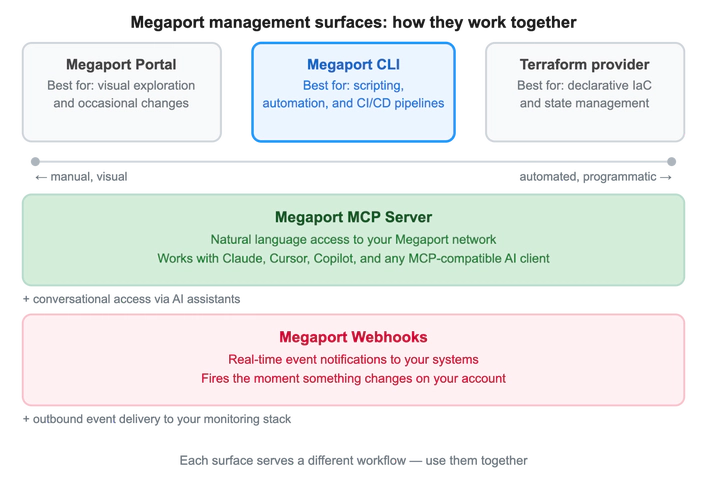
Megaport gives you multiple ways to manage your network. Knowing which tool to use and when is not a trade-off — they coexist, and most engineers use more than one depending on what they are doing.
The CLI sits between the Portal and the Terraform provider on the Megaport management surface.
The Portal covers exploration, occasional changes, and teams who prefer a GUI. Terraform handles declarative state management and infrastructure drift detection. The CLI belongs wherever you want Megaport changes to move through the same pipeline as your code. It skips the overhead of Terraform state for every task.
The MCP Server and Webhooks work alongside all three. For example, Webhooks fire the moment a BGP session drops, routing the alert to your monitoring stack. The Portal gives you a visual overview of affected services, while the MCP Server lets you query service state and narrow the problem in plain English from your AI client.
The CLI scripts the fix, with a command that runs through your pipeline the same way every time. If the fix reveals a configuration that should persist, Terraform captures it in state. Webhooks fire again when the service recovers.
What the CLI covers
The Megaport CLI covers the full Megaport service lifecycle: Port, Virtual Cross Connect(VXC), Megaport Cloud Router (MCR), Megaport Virtual Edge (MVE), Internet Exchange (MegaIX) connections, locations, partners, service keys, users, managed accounts, and billing market configuration.
Every provisioning and update command supports three input modes:
- Interactive prompts (–interactive): Exploratory, step-by-step.
- CLI flags: Quick, one-off commands.
- JSON (–json or –json-file): Scriptable, version-controllable, pipeline-ready.
All list and get commands return structured output as a table, JSON, CSV, or XML, ready to process with jq, display in a dashboard, or import into a spreadsheet.
The Megaport CLI in action
The following examples use the native CLI binary, while the same commands run in Docker.
Example 1: Provision a VXC in one command
A network engineer needs a 1 Gbps VXC from their Sydney port to AWS Direct Connect. With the CLI, this can be achieved in a single command.
# Find the AWS Direct Connect partner port in Sydney
megaport-cli partners list --connect-type AWS --location-id 6

# Provision the VXC using JSON input
megaport-cli vxc buy --json-file ./vxc-syd-aws.json

# Confirm the service is live
megaport-cli vxc get vxc-a4f9c2
The JSON file lives in Git. The same template provisions to staging first, then the same command runs in production. The change is reviewable, repeatable, and rolled back the same way as any other infrastructure change.
Scenario 2: Network changes in your CI/CD pipeline
A DevOps team deploys an application that requires a new Megaport connection. Instead of a manual portal step that sits outside the pipeline, the connection simply provisions on merge.
# GitHub Actions step — provision on merge to main
- name: Provision Megaport VXC
  uses: docker://ghcr.io/megaport/megaport-cli:latest
  env:
    MEGAPORT_ACCESS_KEY: ${{ secrets.MEGAPORT_ACCESS_KEY }}
    MEGAPORT_SECRET_KEY: ${{ secrets.MEGAPORT_SECRET_KEY }}
  with:
    args: vxc buy --json-file ./infra/vxc-prod.json
Network provisioning goes through the same PR review, audit log, and rollback process as application code. The network team is no longer a bottleneck, and the pipeline doesn’t have to wait.
Getting started
When network changes run through the CLI, they carry the same properties as the rest of your infrastructure: version history, review records, rollback paths. Those properties hold whether the command comes from an engineer, a pipeline, or a script. The CLI doesn’t need to distinguish.
The Megaport CLI is open source under the Mozilla Public License 2.0 — no add-on SKU, no license fee. Charges accrue only from the underlying Megaport services you provision, billed exactly as they would be through the Megaport Portal.